 Quick Invoice for TradespeopleFor iPhone. A little easier to get paid.
Paperwork that looks like your business.
Make a quote or an invoice on your iPhone in under a minute. Your logo, your color and your license number lead the page. Send it by text or email before you leave the driveway.
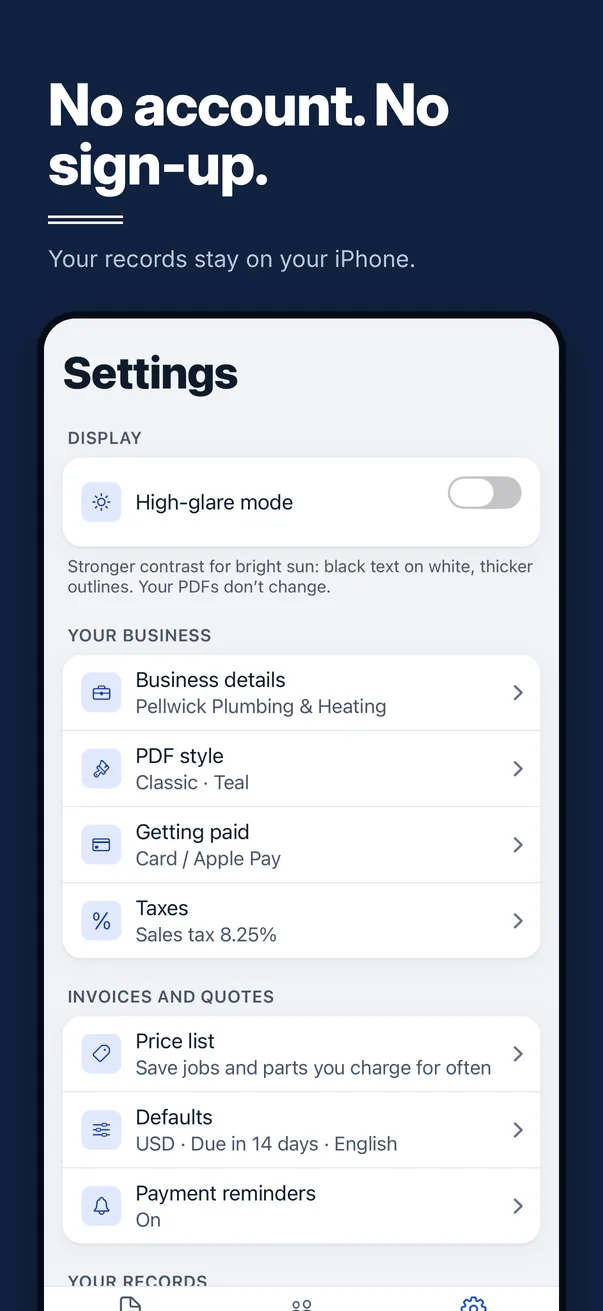
First 5 free to sendNo account. No sign-up.
- No ads
- No tracking
- Your records stay on your iPhone
555-0118
marco@ortegaplumbing.example
1180 Mill Road
Springfield, IL 62704
42 Maple Street
Springfield, IL 62704
555-0142
jordan.rivera@example.com
| Description | Qty | Price | Amount |
|---|---|---|---|
| Replace 50 gal water heater (gas) | 1 | $1,180.00 | $1,180.00 |
| Expansion tank and mounting kit | 1 | $96.50 | $96.50 |
| Shut-off valves, 3/4 in. | 2 | $38.75 | $77.50 |
| Haul away and dispose of old heater | 1 | $75.00 | $75.00 |
| Labor, licensed plumber Not taxed |
4.5 | $110.00 | $495.00 |
| Subtotal | $1,924.00 |
| Sales tax (6.25%) on $1,429.00 | $89.31 |
| Amount due | $2,013.31 |
Your look
Your name leads. Ours stays quiet.
Customers judge the paperwork. A clean invoice with your logo and your license number says they hired a real outfit. So every quote and invoice is built around your details, not ours.
555-0118
marco@ortegaplumbing.example
1180 Mill Road
Springfield, IL 62704
42 Maple Street
Springfield, IL 62704
555-0142
jordan.rivera@example.com
| Description | Qty | Price | Amount |
|---|---|---|---|
| Replace 50 gal water heater (gas) | 1 | $1,180.00 | $1,180.00 |
| Expansion tank and mounting kit | 1 | $96.50 | $96.50 |
| Shut-off valves, 3/4 in. | 2 | $38.75 | $77.50 |
| Haul away and dispose of old heater | 1 | $75.00 | $75.00 |
| Labor, licensed plumber Not taxed |
4.5 | $110.00 | $495.00 |
| Subtotal | $1,924.00 |
| Sales tax (6.25%) on $1,429.00 | $89.31 |
| Total | $2,013.31 |
| Deposit to book the job (25%) | $503.33 |
555-0118
marco@ortegaplumbing.example
1180 Mill Road
Springfield, IL 62704
42 Maple Street
Springfield, IL 62704
555-0142
jordan.rivera@example.com
| Description | Qty | Price | Amount |
|---|---|---|---|
| Replace 50 gal water heater (gas) | 1 | $1,180.00 | $1,180.00 |
| Expansion tank and mounting kit | 1 | $96.50 | $96.50 |
| Shut-off valves, 3/4 in. | 2 | $38.75 | $77.50 |
| Haul away and dispose of old heater | 1 | $75.00 | $75.00 |
| Labor, licensed plumber Not taxed |
4.5 | $110.00 | $495.00 |
| Subtotal | $1,924.00 |
| Sales tax (6.25%) on $1,429.00 | $89.31 |
| Amount due | $2,013.31 |
555-0118
marco@ortegaplumbing.example
1180 Mill Road
Springfield, IL 62704
42 Maple Street
Springfield, IL 62704
555-0142
jordan.rivera@example.com
| Description | Qty | Price | Amount |
|---|---|---|---|
| Replace 50 gal water heater (gas) | 1 | $1,180.00 | $1,180.00 |
| Expansion tank and mounting kit | 1 | $96.50 | $96.50 |
| Shut-off valves, 3/4 in. | 2 | $38.75 | $77.50 |
| Haul away and dispose of old heater | 1 | $75.00 | $75.00 |
| Labor, licensed plumber Not taxed |
4.5 | $110.00 | $495.00 |
| Subtotal | $1,924.00 |
| Sales tax (6.25%) on $1,429.00 | $89.31 |
| Total | $2,013.31 |
| Payment received · Nov 12, 2026 Check #1042 · Balance $0.00 | −$2,013.31 |
| Paid in full | $0.00 |
555-0118
marco@ortegaplumbing.example
1180 Mill Road
Springfield, IL 62704
Calle del Olmo 17
San Antonio, TX 78205
555-0177
lucia.hernandez@example.com
| Descripción | Cant. | Precio | Importe |
|---|---|---|---|
| Cambio de calentador de agua de 50 gal (gas) | 1 | $1,180.00 | $1,180.00 |
| Tanque de expansión y kit de montaje | 1 | $96.50 | $96.50 |
| Llaves de paso, 3/4 in | 2 | $38.75 | $77.50 |
| Retiro y desecho del calentador viejo | 1 | $75.00 | $75.00 |
| Mano de obra, plomero con licencia Sin impuesto |
4.5 | $110.00 | $495.00 |
| Subtotal | $1,924.00 |
| Impuesto sobre las ventas (6.25%) sobre $1,429.00 | $89.31 |
| Total | $2,013.31 |
| Anticipo para reservar el trabajo (25%) | $503.33 |
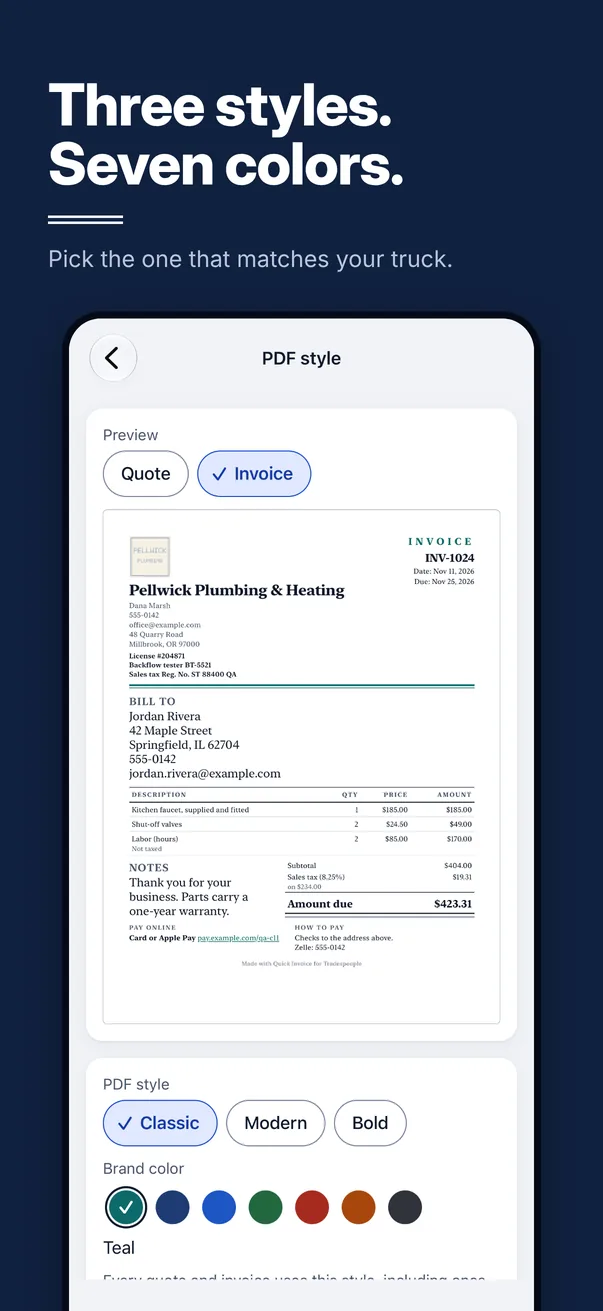
Three styles. Seven colors.
Classic, Modern or Bold. Pick the one that matches your truck. Every quote and invoice uses it.
Your logo and your license
Add your logo once. Your license number and tax numbers print under your name, where customers look.
Our name, small or gone
The only mention of us is one small line at the bottom of the page. One switch in Settings turns it off.
How it works
From the quote to the money.
Quote it on the job
Pick the client, add the work, see the total. Ask for a deposit to book the job if you want one.
Send it your way
By text, by email, or as a PDF through the apps you already use. The PDF goes with your message.
One tap to invoice
When the client says yes, turn the quote into an invoice with one tap. Nothing gets typed twice.
Get paid
Record full and part payments and send a receipt. Add your PayPal, Venmo, Cash App or card link, and clients can pay from the invoice.
The real screens
Straight from the app, with made-up sample data.
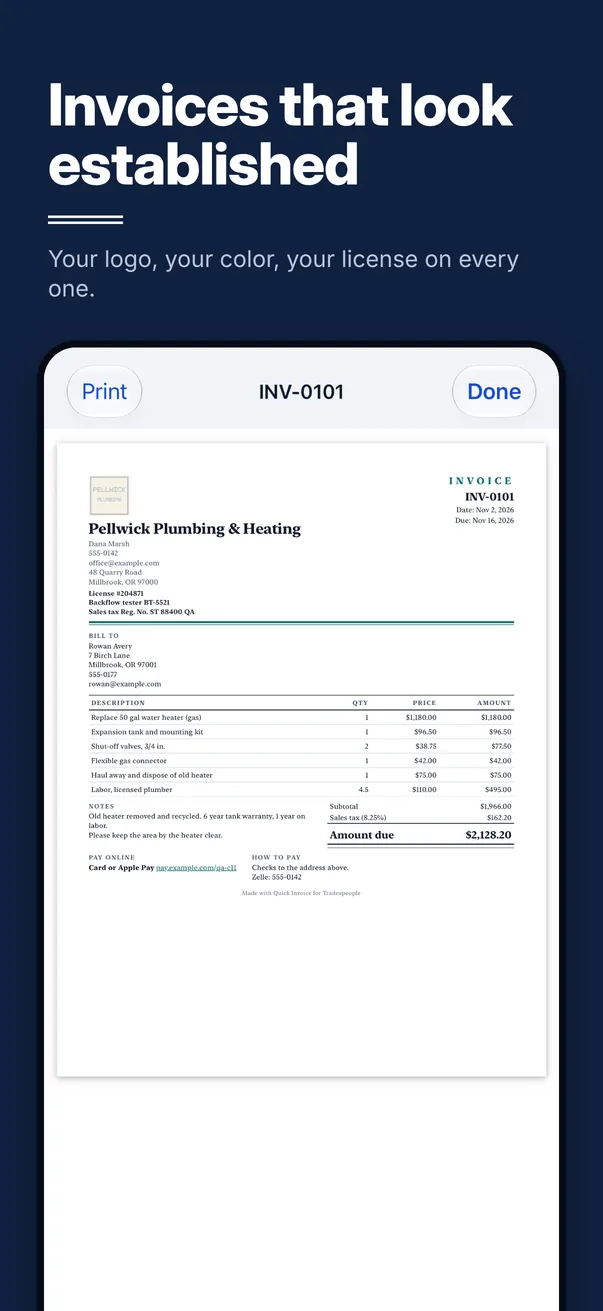
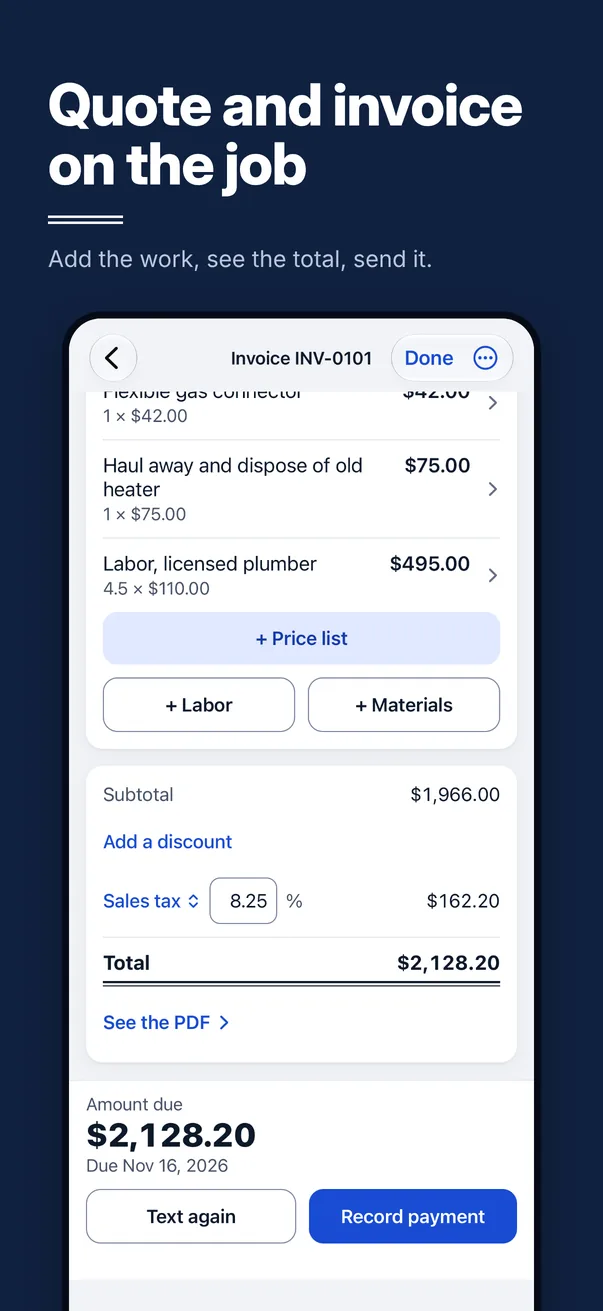
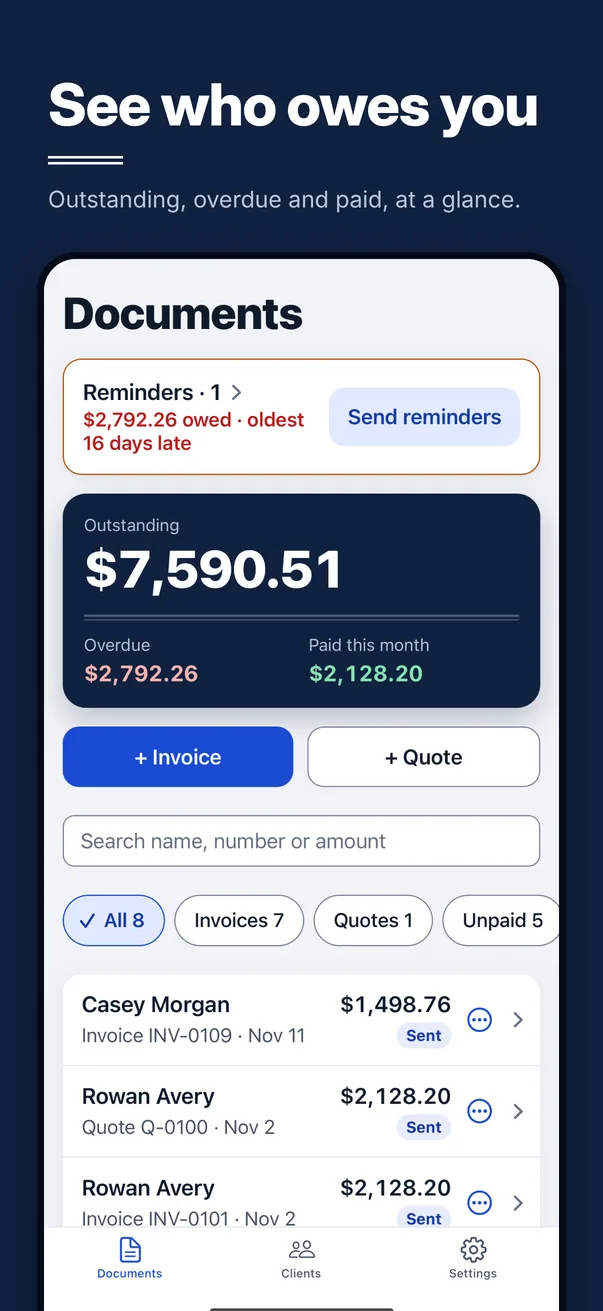
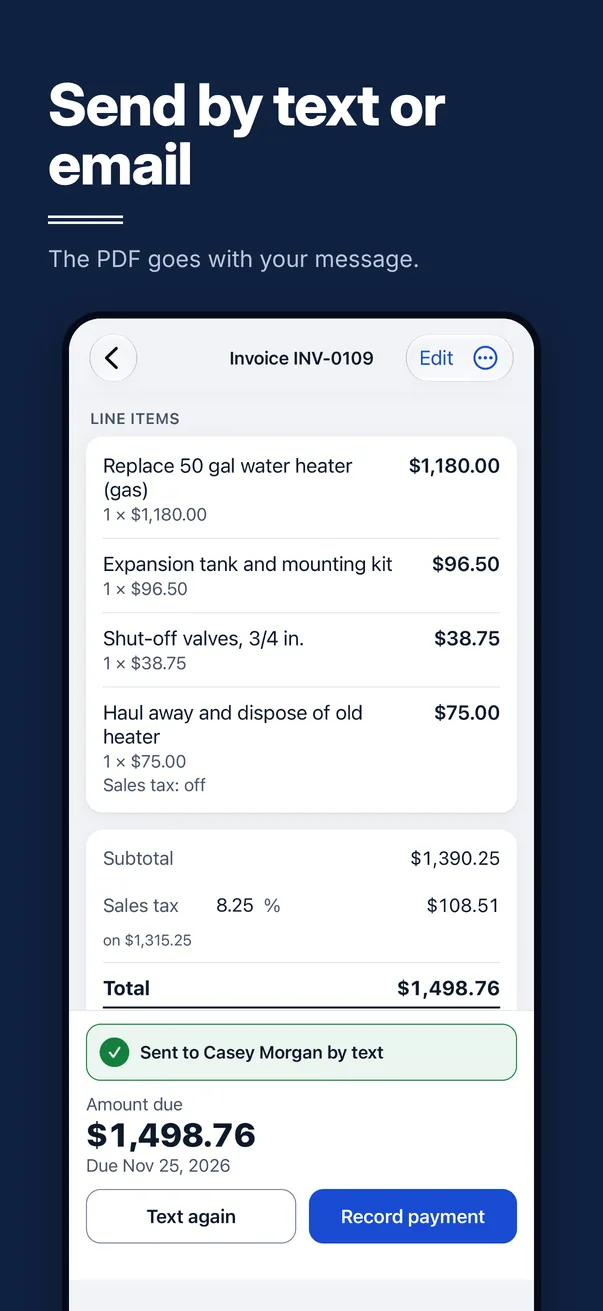
What's in the box
One job, done properly.
Quick Invoice does quotes, invoices and getting paid. Here is everything in it today.
Chase less
- See who owes you and what's late at a glance.
- The app suggests a reminder when an invoice runs late. You tap send.
- A quote with no answer gets a friendly follow-up suggested after 3 days, and one more 7 days later. Then it stops.
Regular work
- Repeating invoices for regular clients: every week, every 2 weeks or every month.
- Each one is ready to send when it's due.
- Save your clients and your price list, so nothing gets typed twice.
Job photos
- Up to 6 photos on each quote or invoice.
- You choose which ones your client sees. They print on their own page at the end of the PDF.
- Free on every plan.
Straight records
- A sent invoice is locked, so it can't change by accident.
- Mistakes are voided, not deleted. A number that has gone to a client is never used again.
- Export invoices and payments as CSV files for your accountant.
En español
- Choose English or Spanish for each client.
- Their quotes, invoices, texts, emails, reminders and receipts come out in that language.
- The app's own screens are in English.
Built for the site
- High-glare mode: black on white with thick outlines, for reading in bright sun.
- Discounts, deposits, a job site address, and up to two taxes, with labor taxed or not.
- Works with Larger Text and VoiceOver.
What sets it apart
Your books stay in your pocket.
Many invoicing tools start by asking for an email and a password, then keep your records on their computers. This one doesn't.
Pricing
Five free. Then one plain price.
Send your first 5 invoices or quotes free. If it earns its keep, Quick Invoice Pro keeps you sending.
Free to start
5free sends
Your first 5 invoices or quotes are free to send.
Each quote or invoice counts once, the first time it goes to a client. Drafts, previews and receipts never count.
Quick Invoice Pro
$9.99a month
or $79.99 a year
Unlimited new invoices and quotes, including your repeating invoices.
US prices. The App Store shows the price in your country before you subscribe.
Download on theApp StoreAlways free
With or without Pro, you can always:
- Record payments and send receipts
- Resend or remind about anything already sent
- Follow up on quotes you sent
- Add job photos
- Back up and export everything
Quick Invoice Pro is a monthly or yearly subscription, bought in the app. Payment is charged to your Apple Account when you confirm. Subscriptions renew automatically unless canceled at least 24 hours before the end of the period. Manage or cancel any time on your iPhone in Settings › your name › Subscriptions. Step by step. Terms of Use. Privacy Policy.
Plain dealing
Quick Invoice is for one person with one iPhone. It doesn't schedule crews, it has no web dashboard, and it doesn't process cards itself: your pay links go to your own accounts.
If you need those things, this isn't the tool. If you want the paperwork done before you leave the job, it is.
Send the next one from the driveway.
Free to download. Your first 5 invoices or quotes are free to send. No account, no sign-up.
Download on theApp Store